An AI agent in every department
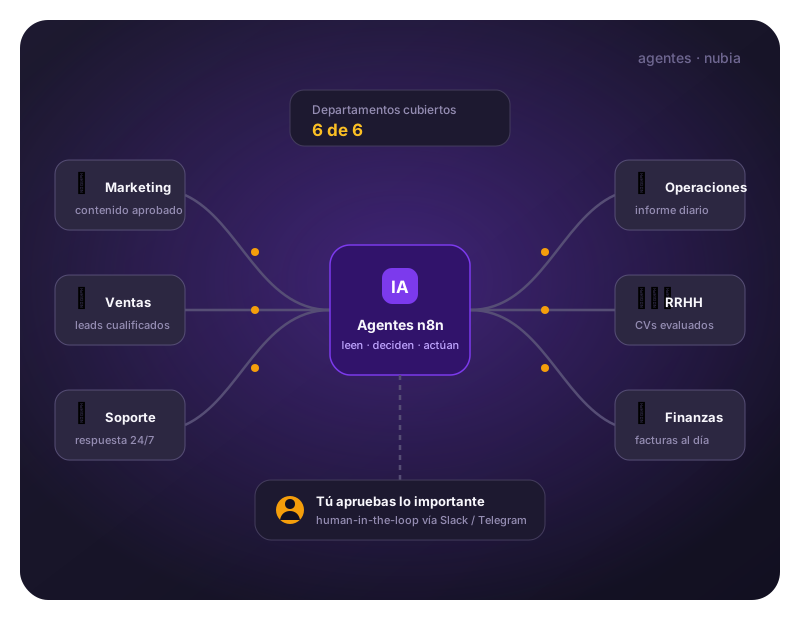
Six agents built with n8n that work like digital employees: they read your data, decide with judgement and act in your tools —and they ask permission when the matter warrants it. Marketing, operations, HR, sales, support and finance.
Deployed individually or as a suite · Human-in-the-loop by default
The suite
Six agents, six departments covered
Each agent solves a complete process from end to end. Expand each one's flow to see exactly what it does, step by step.
Marketing Agent
Scheduled · every morning
Turns your editorial calendar into published content. It reads what's planned for today, researches trends around the topic, writes in your brand voice and waits for your approval before taking anything for granted.
See the step-by-step flow
Reads the editorial calendar. Filters the content sheet for what's planned today; if there's nothing, it quietly stops.
Researches before writing. Searches the web for trends on the topic and checks previous posts to avoid repeating itself.
Writes the content. Headline, body and hashtags tailored to the channel and content pillar, in your tone.
Asks for approval on Slack. Sends the draft with Approve / Reject buttons and waits for the team's decision.
Updates the calendar. Marks the row as published or rejected, keeping the history current.
- Consistent content with a consistent brand voice
- Zero repeats thanks to the post memory
- One-click approval, without leaving Slack
- n8n
- LLM Agent
- Google Sheets
- SerpAPI
- Slack
Operations Agent
Scheduled · every morning
The company's digital supervisor. Every morning it reads the indicators from all five departments, spots anomalies and delivers management an executive report with alerts and recommendations.
See the step-by-step flow
Gathers the whole company's KPIs. Accesses the marketing, sales, support, finance and HR sheets all at once.
Analyses and flags alerts. Compares against the previous day: unresolved urgent tickets, drops in leads, unusual expenses.
Writes the executive report. A plain-language summary with what matters, the alerts and the day's recommendations.
Publishes and archives. Sends the report to the management channel and stores it in a history to spot trends.
- A 360° view of the business every morning
- Proactive alerts before problems escalate
- A report history to analyse trends
- n8n
- LLM Agent
- Google Sheets ×5
- Slack
HR Agent
Event · new application
A recruitment pipeline that works on its own. It receives each application with its CV in PDF, assesses the fit for the role and handles the response: an interview scheduled for those who qualify, kind feedback for the rest.
See the step-by-step flow
Receives the application. The web form sends name, email, position and the CV attached as a PDF.
Reads the CV. Extracts the text from the PDF so the agent can analyse it.
Assesses the fit for the role. Checks the role's requirements and scores experience and skills from 0 to 100, with justification.
Decides the route. Based on the threshold you set (e.g. 70), it separates those fit for an interview from the rest.
Replies to each candidate. Qualified: an event on the interviewer's calendar + an invitation email. The rest: a constructive feedback email in your tone.
Logs the process. Stores candidate, score and outcome in the candidate database: fully traceable.
- CV screening in seconds, not days
- A candidate experience that's cared for even in rejection
- A traceable, auditable selection process
- n8n
- LLM Agent
- PDF Extractor
- Google Sheets
- Google Calendar
- Gmail
Sales Agent
Event · new lead
Qualifies each lead in real time: it researches the company online, applies BANT criteria, writes a hyper-personalised first email and only alerts the team when the lead is hot.
See the step-by-step flow
Captures the lead. Receives name, email, company and message from the form and normalises the data.
Researches the company. Searches the web to learn who they are, checks whether they already exist in your CRM, and scores the lead from 0 to 100 on BANT criteria.
Decides whether it's qualified. Hot, warm or cold: only those above the threshold trigger immediate contact.
First contact + team alert. Sends a personalised reply email with real context and notifies the sales channel with the profile and score.
Logs it in the CRM. Data, score and segment are stored for commercial follow-up.
- A reply to the lead in seconds, not the next day
- The sales team only handles pre-qualified leads
- A first email with real context about the prospect's company
- n8n
- LLM Agent
- SerpAPI
- Google Sheets (CRM)
- Gmail
- Slack
Customer Support Agent
Event · support email
Processes the support inbox in real time: it classifies each email, looks up the answer in your knowledge base and decides whether to reply itself or escalate to a person based on urgency and category.
See the step-by-step flow
Detects the incoming email. Watches the support inbox and triggers on every new message.
Classifies and analyses. Query / issue / billing, high-medium-low urgency, a search of the FAQ and the client's history.
Routes each case. Three outputs: an automatic reply, escalation to a human or a log with no immediate action.
Replies or escalates. Replies to the client on the original thread, or alerts the support channel with a summary, urgency and context.
Logs the ticket. Every case is stored with its fields for metrics and follow-up.
- An immediate 24/7 reply to frequent queries
- Smart escalation: people only see what's urgent
- Full traceability of every ticket
- n8n
- LLM Agent
- Gmail
- Google Sheets (FAQ + history)
- Slack
Finance Agent
Event · invoice received
Books the invoices that arrive by email without anyone keying in data: it extracts the fields from the PDF, categorises the expense, spots anomalies and asks for human approval on large amounts.
See the step-by-step flow
Detects the invoice. Watches the invoice inbox and triggers on every email with a PDF attached.
Extracts the data. Supplier, tax ID, invoice number, date, net amount, VAT and total, read from the PDF.
Categorises and monitors. Assigns the expense category according to your chart of accounts and detects duplicates, amounts that don't add up or unknown suppliers.
Logs it in the expense ledger. All the structured fields are stored with a pending status.
Approval by amount. Below the threshold (e.g. €500) it's approved on its own; above it, it reaches you on Slack with Approve / Reject buttons.
- Bookkeeping without manual data entry
- Duplicates and anomalies caught immediately
- Control over large expenses with one-click approval
- n8n
- LLM Agent
- PDF Extractor
- Google Sheets
- Slack
Architecture
Different agents, one solid foundation
All six share the same technical foundations. That's why deploying the second agent costs half what the first did, and the third even less.
AI layer
Every agent shares the same base: an LLM agent in n8n with your brand's identity in the prompt and structured output that's validated before continuing. The model (GPT, Gemini…) is chosen per case and swapped without rebuilding the flow.
Triggers
Two patterns: scheduled tasks (reports, content) and real-time events (a lead, an application, an email, an invoice). The agent works when something happens, not when someone remembers.
Your data, organised
The suite starts with Google Sheets as an operational base —CRM, expenses, vacancies, tickets— to validate quickly, then migrates to your real CRM or ERP once the process is running smoothly.
Human-in-the-loop
Wherever there's risk, there's a person: content approval before publishing, large expenses before booking and escalation to a human on delicate tickets. The AI proposes; you decide.
Launch Kit
Want to see it from the inside? Download it and open it in your n8n
The 6 agents in this suite are included in the Launch Kit: import them into your n8n, open them up and see exactly how they're built, with their prompts and tools.
How it's rolled out
You don't have to start with all six
The suite is designed to grow with you, not to sell you a mega-project.
Start with one department
The one that hurts most. One agent running in weeks is worth more than six in a PowerPoint.
We connect your tools
Your email, your calendar, your Slack or Teams, your CRM. The agents adapt to what you already use.
Expand agent by agent
They all share an architecture: adding the next department gets faster each time.
Looking for something more specific? Check out RecepBot for appointments, PubliBot for content, or request a custom agent.
— Let's begin
Request a demo of the suite
Tell us which department is drowning you most and we'll show you its agent working on a case like yours. No commitment.